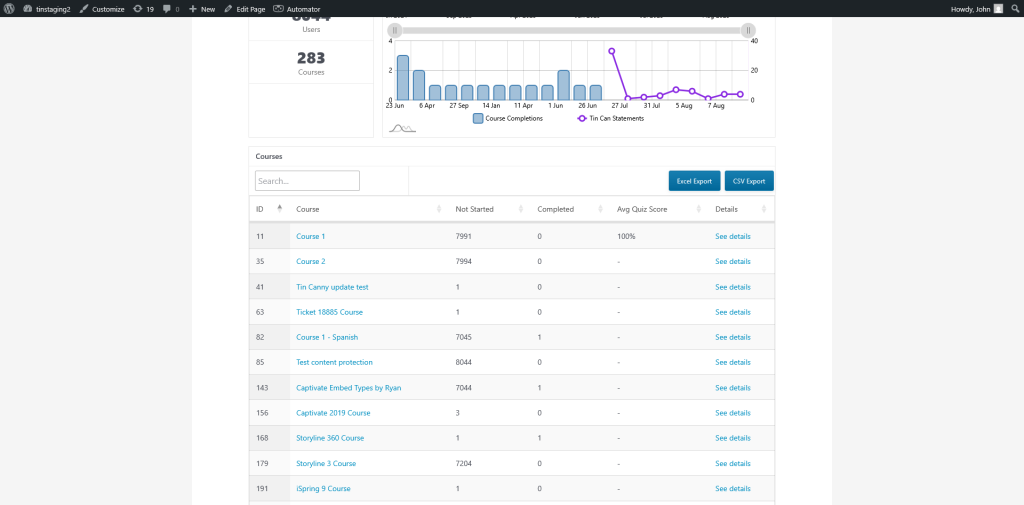
There is currently no setting to enable/disable columns for the front end Course Report.
However, an action filter can be used to remove columns. Each column is identified via a numeric value.
Column Name
ID
Course
Enrolled
Not Started
In Progress
Completed
Avg Quiz Score
% Complete
Details
Numeric Value
1
2
3
4
5
6
7
8
9
Using the chart above to identify the columns you wish to hide, modify the snippet below to hide specific columns. Each column has a “th” element and a “td” element that needs to be included in order to remove the column.
add_action('wp_footer', 'front_hide_columns_in_report_table');
function front_hide_columns_in_report_table() {
    ?>
    <style>
      /* 1) Kill DataTables' fixed column widths */
      #coursesOverviewTable colgroup { display: none !important; }

      /* 2) Hide 3rd, 5th, and 8th columns (header + body) */
      #coursesOverviewTable th:nth-child(1),
      #coursesOverviewTable th:nth-child(2),
      #coursesOverviewTable th:nth-child(3),
      #coursesOverviewTable th:nth-child(4),
      #coursesOverviewTable th:nth-child(5),
      #coursesOverviewTable th:nth-child(6),
      #coursesOverviewTable th:nth-child(7),
      #coursesOverviewTable th:nth-child(8),
      #coursesOverviewTable th:nth-child(9),
      #coursesOverviewTable td:nth-child(1),
      #coursesOverviewTable td:nth-child(2),
      #coursesOverviewTable td:nth-child(3),
      #coursesOverviewTable td:nth-child(4),
      #coursesOverviewTable td:nth-child(5),
      #coursesOverviewTable td:nth-child(6),
      #coursesOverviewTable td:nth-child(7),
      #coursesOverviewTable td:nth-child(8),
      #coursesOverviewTable td:nth-child(9) {
        display: none;
      }

      /* 3) Let remaining columns stretch */
      #coursesOverviewTable { width: 100% !important; table-layout: auto !important; }
      #coursesOverviewTable thead th,
      #coursesOverviewTable tbody td { width: auto !important; }
    </style>
    <?php
}
Here is a sample snippet that will hide the “Enrolled”, “In Progress” and “% Complete” columns:
add_action('wp_footer', 'front_hide_columns_in_report_table');
function front_hide_columns_in_report_table() {
    ?>
    <style>
      /* 1) Kill DataTables' fixed column widths */
      #coursesOverviewTable colgroup { display: none !important; }

      /* 2) Hide 3rd, 5th, and 8th columns (header + body) */
      #coursesOverviewTable th:nth-child(3),
      #coursesOverviewTable td:nth-child(3),
      #coursesOverviewTable th:nth-child(5),
      #coursesOverviewTable td:nth-child(5),
      #coursesOverviewTable th:nth-child(8),
      #coursesOverviewTable td:nth-child(8) {
        display: none !important;
      }

      /* 3) Let remaining columns stretch */
      #coursesOverviewTable { width: 100% !important; table-layout: auto !important; }
      #coursesOverviewTable thead th,
      #coursesOverviewTable tbody td { width: auto !important; }
    </style>
    <?php
}
Screenshot showing snippet in action